Posts

Philippines-based and US-Led Fractional Near+Offshore Engineering, DevRel, Digital Marketing & Strategy

Image
Philippines-based Fractional Near+Offshore Engineering, DevRel, Digital Marketing & Strategy  Design   Build   Launch   Scale US trained & educated leadership + full-service consultancy with broad experience across Fortune 500, Silicon Valley and Web3 Unleash the potential of your startup with the only Manila-based Web3 Near+Offshoring consulting startup with US educated and trained leadership. We provide the expertise of Silicon Valley multiplied by the cost-effectiveness of Philippine-based near+offshoring. New consulting website! Web3 Philippines based fractional engineering

Building Microservices with JHipster

Image
Check out this article on Medium and LinkedIn Pulse, for a brief overview of microservices as a primer for working with JHipster to build web applications with a Microservices backend. Building microservices with Jhipster JHipster is sponsored by Ippon Technologies(https://www.ippon.tech/). Need cost-effective fractional engineering with US expertise? Web3 Philippines based fractional engineering

Setup Local AWS SQS Service with Elastic MQ and Spring Cloud

Introduction Amazon Simple Queue Service (SQS) is a service on Amazon Web Services that provides a scalable message queuing service for loosely-coupled and reliable communication among distributed software components and microservices. In this article, we will setup a local Elastic MQ service, which will simulate a SQS service and use Spring Cloud to push messages to that queue. With a minimal amount of configuration, this service can be deployed to a EC2 instance and integrate with an actual SQS service. We will be focusing on the standard SQS queue. The other option, a FIFO Queue is limited to 300TPS(300 transactions per second) and is not a valid use-case for many high-throughput applications. Characteristics of a Standard SQS Queue Fully-managed, high throughput messaging queue . Standard queues have nearly-unlimited transactions per second (TPS). Designed for concurrency with multiple message producers and consumers . Multiple parts of your system can send or r...

Integrate Wiremock into Spring Boot Java Web Application for Mocking External Dependencies

Introduction WireMock is a mock server for HTTP-based APIs. Some might consider it a service virtualization tool or a mock server. It enables you to stub out an API or other external dependency you depend on to expedite local development. It supports testing of edge cases and failure modes that the real API won't reliably produce. It also is useful in mocking out external dependencies in unit and integration tests. It has excellent integration with jUnit. Add Wiremock Dependency First you will want to add the Wiremock dependency. You can download the regular dependency or the fat JAR stand-alone version that contains all it's dependencies. We will be using the standard dependency here. Add the following dependency to your build.gradle build.gradle dependencies { testCompile('com.github.tomakehurst:wiremock:2.1.12') } Add Wiremock Unit test Here is the complete unit test that you can use for testing your integration with Wiremock. This unit te...

Error with Gradle Build SonarQube Plugin Registering Findbugs Plugin

Image
How to Fix the Error: Unable to register extension org.sonar.plugins.findbugs.FindbugsConfiguration when Running Gradle sonarqube task Using Gradle, Sonarqube and Findbugs you may get the following error when you try to execute the command: ./gradlew clean build sonarqube Here is the error: FAILURE: Build failed with an exception. * What went wrong: Execution failed for task ':sonarqube'. > Unable to register extension org.sonar.plugins.findbugs.FindbugsConfiguration * Try: Run with --stacktrace option to get the stack trace. Run with --info or --debug option to get more log output. BUILD FAILED Root Cause This bug seems to occur when there is a mismatch of versions that don't play nice together. For instance here are the versions of our stack: Sonar Version: 5.3 SonarQube Gradle Plugin:  2.0.1 Update Findbugs plugin on Sonar: First, we had to update our Sonar server: Navigate to the Update Center Navigate to the Sonar Update Ce...

Install a Local Instance of AWS DynamoDB

Image
STEP 1:  Press Command+Space and type Terminal and press enter/return key . STEP 2:   Install Brew(If you don't already have it installed.)  Run this command in the Terminal app. ruby -e "$(curl -fsSL https://raw.githubusercontent.com/Homebrew/install/master/install)" < /dev/null 2> /dev/null Then press enter and wait for the command to finish. STEP 3:   Use Brew to install and download dynamoDB so that you can run it locally. brew install dynamodb-local Launch your DynamoDB local instance like this: To have start dynamodb-local now and restart at login as a background service using brew services:   brew services start dynamodb-local Or, if you don't want/need a background service you can just run:   /usr/local/bin/dynamodb-local You can then access a JS Shell in a browser such as Chrome: URL to hit the Javascript shell for your locally running DynamoDB instance: http://localhost:8000/shell/ This is wh...

Suppress FindBugs Warnings in a Java and Spring Boot Web Application using Gradle

Image
How to Suppress FindBugs Warnings using Annotations in a  +Spring  Boot and +Java  Application If your build is breaking because of a FindBugs issue and it is a false-positive or you are unable to resolve the issue because of other considerations, you can add an Annotation to ignore the Findbugs warning. Update your Gradle Dependencies You will want to add the following compile time dependency to your build.gradle file. compile group: 'findbugs', name: 'findbugs', version: '1.0.0' dependencies { compile group : 'findbugs' , name : 'findbugs' , version : '1.0.0' } Get the Findbugs Issue ID You will need a specific ALL_CAPS identifier so that FindBugs knows what bug to ignore. Locate the FindBugs Report In your build message, you will see a link to the findbugs report: file:///Users/canata/IdeaProjects/projectname/build/reports/findbugs/main.html You can also find the report in your buil...

Whirlwind Tour of JavaOne and Oracle Openworld 2015

JavaOne 2015 Roundups and Summary Articles I recently had the wonderful opportunity of attending JavaOne and Oracle Openworld 2015 and have extensively blogged about the social and technical aspects of the conference! Get a taste of the many events and exhibits on display and an insider's view on the conference.  I will also be presenting the most important takeaways regarding the future direction of Java including an in-depth discussion of changes coming in Java 9 and how to best prepare for those upcoming changes. If you are local to the Richmond,VA then check out our meetup on the topic! http://www.meetup.com/Richmond-Java-Users-Group/events/225877596/ JavaOne 2015 Day 1 Roundup #JavaOne Day 1 roundup: https://t.co/1UpcvxZuIz - Keynote, Welcome event, #jdk9 #java 10/11 previews #JavaOne2015 pic.twitter.com/NynOszVTuf — Ippon USA (@IpponUSA) October 26, 2015 JavaOne 2015 Day 2 Roundup #JavaOne Day 2 roundup: Focus on #JDK9 and proje...

Running a new jHipster Application using Compass and the main CSS file is not loading

Image
How to fix a Newly Created jHipster Application not Loading the Main CSS File  If you see an error similar to the following upon first startup of a jHipster application you have just created: Failed to load resource: the server responded with a status of 404 (Not Found) http://127.0.0.1:8080/assets/styles/main.css jHipster with CSS not loaded Then you will need to run the grunt task, grunt compass. Install Compass You will need to first install Compass, an open-source CSS Authoring Framework before you can run the Grunt task to create the main.css file which is missing. Using node: npm install compass Reference the following link for more info about installing compass using npm https://www.npmjs.com/package/compass Run Grunt Task After you install Compass, you will then need to run the grunt task.  In in IntelliJ you can click the grunt task runner at the bottom of your screen or go to Tools -> Open Grunt Console. Run...

Spring Scheduler to Create Background Process to make Async Calls to Update Cache in Spring Boot

Image
Using Spring Scheduler to Create a Scheduled Task that hits your Endpoints to Update a Spring Cache for a Spring Boot Application I used Spring Scheduler to execute a process on a regular basis to make separate async calls to several endpoints to keep the Spring cache updated and also as a health monitor. This serves two purposes for us, we monitor all the endpoints to ensure correct data is coming back and it keeps the caches fresh and up to date even when there hasn't been traffic on that endpoint recently. Guides on how to setup Spring caching: https://spring.io/guides/gs/caching/ http://codedevstuff.blogspot.com/2015/07/add-guava-cache-to-spring-boot-to-cache.html Guide on Spring Scheduler:   http://spring.io/guides/gs/scheduling-tasks/ View all the code used in this article on Github here: https://gist.github.com/anataliocs/61291ea9a96f8a642a61 The Spring Framework is maintained by Pivotal +Spring by Pivotal   Spring Scheduler Yo...

Add Guava Cache to Spring Boot to Cache Method Calls

Image
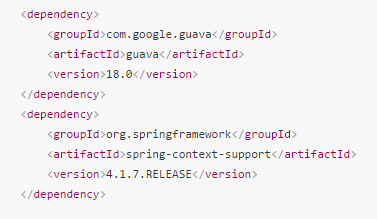
Add Google Guava Cache to Spring Boot to Cache the Results of Method Calls using Java Config and Spring Annotations If you have a time-intensive method that is slowing down your application and the results of that method don't change very often, it is a good candidate for caching.  This guide will show you how to implement caching in your Spring Boot application using Google Guava cache.   Guava cache is a simple, lightweight in-memory cache that has more configuration options then the default In-Memory Spring Cache.  Guava cache is not for clustered systems, for that you will want to use Hazelcast  http://hazelcast.com/ So if you just need a simple cache but you want more config options such as cache expiration time, then this approach may fit your use case.  Alternatively, you could use EhCache. Full source code references can be found at the bottom of the article. More info on Guava Cache: https://code.google.com/p/guava-libraries/wiki/...

Spring Boot Internationalization with Default Locale for Message Strings

Image
How to add Spring Boot Internationalization with Default Locale for Storing Message Strings such as Validation Messages in a message.properties file   This article will show you how to use a properties file to define static text in your application such as for validation message. All the code is appended at the bottom of the article.  You can also view all the code here: Link to Github Gist here Add Default locale and Message Source beans to your Application class   Add these classes to set your default locale and configure the location of your message properties file   Add locale and MessageSource beans to your Application Class Add a Service and Interface to retrieve message text   This service will pull the default locale from the session and then get the message text from your properties file using the messageSource. Add a service to get the msgs in your props file In your controller, use the Message s...

Change Port on a Spring Boot Application when using intelliJ

Image
Change Port on a Spring Boot Application when using intelliJ  Two ways to change the port that the embedded Tomcat is using in a Spring Boot Application. The first way is to modify the application properties in the resources folder: Update application props in Spring Boot Application There are a couple issues with this approach.  You might only want this port change in your local environment and if you check it in by accident you might break things. Alternatively, you can use a command line parameter. Go to Run -> Edit Configurations -> VM options Then enter in the following argument: -Dserver.port=8090 Then click apply and OK and attempt to run the application again. Update port using VM option

Convert Multiple Tasks to Sub-Tasks in JIRA similar to Bulk Update using Script Runner

Image
How to Convert A Large Number of JIRA Tasks into Sub-Tasks using the Adaptavist Script Runner Plugin with JIRA In JIRA, there is no way to convert Tasks into Sub-Tasks using the built-in Bulk Update functionality.  The lack of the feature is described in many JIRA tickets and Confluence posts on the official Atlassian site such as the two listed below: https://jira.atlassian.com/browse/JRA-13245 https://answers.atlassian.com/questions/37825/is-there-a-way-to-en-mass-convert-subtask-to-issues There are many potential workarounds to this such as using selenium scripting to automate the conversion process using browser automation.  The best solution I have found is to use scripting within JIRA. Backup your System Before you attempt this, you should backup your JIRA instance because you potentially can make changes to tasks you did not intend. Go to System settings and scroll down to the IMPORT & EXPORT section: Backup your JIRA insta...