Posts

Showing posts with the label spring boot

Suppress FindBugs Warnings in a Java and Spring Boot Web Application using Gradle

Image
How to Suppress FindBugs Warnings using Annotations in a  +Spring  Boot and +Java  Application If your build is breaking because of a FindBugs issue and it is a false-positive or you are unable to resolve the issue because of other considerations, you can add an Annotation to ignore the Findbugs warning. Update your Gradle Dependencies You will want to add the following compile time dependency to your build.gradle file. compile group: 'findbugs', name: 'findbugs', version: '1.0.0' dependencies { compile group : 'findbugs' , name : 'findbugs' , version : '1.0.0' } Get the Findbugs Issue ID You will need a specific ALL_CAPS identifier so that FindBugs knows what bug to ignore. Locate the FindBugs Report In your build message, you will see a link to the findbugs report: file:///Users/canata/IdeaProjects/projectname/build/reports/findbugs/main.html You can also find the report in your buil...

Spring Scheduler to Create Background Process to make Async Calls to Update Cache in Spring Boot

Image
Using Spring Scheduler to Create a Scheduled Task that hits your Endpoints to Update a Spring Cache for a Spring Boot Application I used Spring Scheduler to execute a process on a regular basis to make separate async calls to several endpoints to keep the Spring cache updated and also as a health monitor. This serves two purposes for us, we monitor all the endpoints to ensure correct data is coming back and it keeps the caches fresh and up to date even when there hasn't been traffic on that endpoint recently. Guides on how to setup Spring caching: https://spring.io/guides/gs/caching/ http://codedevstuff.blogspot.com/2015/07/add-guava-cache-to-spring-boot-to-cache.html Guide on Spring Scheduler:   http://spring.io/guides/gs/scheduling-tasks/ View all the code used in this article on Github here: https://gist.github.com/anataliocs/61291ea9a96f8a642a61 The Spring Framework is maintained by Pivotal +Spring by Pivotal   Spring Scheduler Yo...

Add Guava Cache to Spring Boot to Cache Method Calls

Image
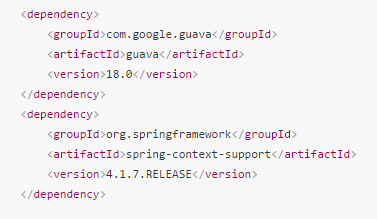
Add Google Guava Cache to Spring Boot to Cache the Results of Method Calls using Java Config and Spring Annotations If you have a time-intensive method that is slowing down your application and the results of that method don't change very often, it is a good candidate for caching.  This guide will show you how to implement caching in your Spring Boot application using Google Guava cache.   Guava cache is a simple, lightweight in-memory cache that has more configuration options then the default In-Memory Spring Cache.  Guava cache is not for clustered systems, for that you will want to use Hazelcast  http://hazelcast.com/ So if you just need a simple cache but you want more config options such as cache expiration time, then this approach may fit your use case.  Alternatively, you could use EhCache. Full source code references can be found at the bottom of the article. More info on Guava Cache: https://code.google.com/p/guava-libraries/wiki/...

Spring Boot Internationalization with Default Locale for Message Strings

Image
How to add Spring Boot Internationalization with Default Locale for Storing Message Strings such as Validation Messages in a message.properties file   This article will show you how to use a properties file to define static text in your application such as for validation message. All the code is appended at the bottom of the article.  You can also view all the code here: Link to Github Gist here Add Default locale and Message Source beans to your Application class   Add these classes to set your default locale and configure the location of your message properties file   Add locale and MessageSource beans to your Application Class Add a Service and Interface to retrieve message text   This service will pull the default locale from the session and then get the message text from your properties file using the messageSource. Add a service to get the msgs in your props file In your controller, use the Message s...

Change Port on a Spring Boot Application when using intelliJ

Image
Change Port on a Spring Boot Application when using intelliJ  Two ways to change the port that the embedded Tomcat is using in a Spring Boot Application. The first way is to modify the application properties in the resources folder: Update application props in Spring Boot Application There are a couple issues with this approach.  You might only want this port change in your local environment and if you check it in by accident you might break things. Alternatively, you can use a command line parameter. Go to Run -> Edit Configurations -> VM options Then enter in the following argument: -Dserver.port=8090 Then click apply and OK and attempt to run the application again. Update port using VM option