Posts

Convert Multiple Tasks to Sub-Tasks in JIRA similar to Bulk Update using Script Runner

Image
How to Convert A Large Number of JIRA Tasks into Sub-Tasks using the Adaptavist Script Runner Plugin with JIRA In JIRA, there is no way to convert Tasks into Sub-Tasks using the built-in Bulk Update functionality.  The lack of the feature is described in many JIRA tickets and Confluence posts on the official Atlassian site such as the two listed below: https://jira.atlassian.com/browse/JRA-13245 https://answers.atlassian.com/questions/37825/is-there-a-way-to-en-mass-convert-subtask-to-issues There are many potential workarounds to this such as using selenium scripting to automate the conversion process using browser automation.  The best solution I have found is to use scripting within JIRA. Backup your System Before you attempt this, you should backup your JIRA instance because you potentially can make changes to tasks you did not intend. Go to System settings and scroll down to the IMPORT & EXPORT section: Backup your JIRA insta...

Tired Engineers: Welcome to the Future of Coffee Automation

Image
Welcome to the Future of Coffee Automation Introducing Brew().  A Coffee Automation system to initiate coffee brewing whenever your code quality starts to slip. Brew detects when you start writing crappy code, brews you some coffee, and empowers you to PUT DOWN THE KEYBOARD AND PICK UP THE MUG! The future of productivity for Software Engineers Brew() will save your life and the lives of your team.  Engineers depend on it. So what are you waiting for!?!?! Learn more about brew here:   Brew()

Add Stormpath User Mgmt Dependencies to Grails

Add Stormpath User Mgmt Dependencies to Grails How to add dependencies for Stormpath to your grails application. In your BuildConfig.groovy in the dependencies section you need to add 3 dependencies. These artifacts are up to date as of 2/2/2015 so you may need to look up the newest version here:   http://docs.stormpath.com/java/quickstart/ Here are the dependencies you need to add. BuildConfig.groovy dependencies { //Stormpath user mgmt compile 'com.stormpath.sdk:stormpath-sdk-api:1.0.RC3.1' runtime 'com.stormpath.sdk:stormpath-sdk-httpclient:1.0.RC3.1' runtime 'com.stormpath.sdk:stormpath-sdk-oauth:1.0.RC3.1' } Here are the original Maven imports in XML format for reference: < dependency > < groupId > com.stormpath.sdk </ groupId > < artifactId > stormpath-sdk-api </ artifactId > < version > 1.0.RC3.1 </ version > </ dependency > <...

Use Chrome for Development and Allow Cross-domain Javascript and AJAX

Image
Use Another Instance of Chrome while Retrieving Content or Data from an Ajax Source on a Different Domain If you are developing an application and calling a data source from another domain, you may encounter trouble when trying to use AJAX to retrieve a JSON data source from a service API for instance. You may see an error message like the following: Chrome XMLHttpRequest cannot load [THE_URL_ENDPOINT].  No 'Access-Control-Allow-Origin' header is present on the requested resource. Origin 'http://localhost:8080' is therefore not allowed access. - OR - IE SEC7118: XMLHttpRequest for [THE_URL_ENDPOINT] required Cross Origin Resource Sharing (CORS).  SEC7119: XMLHttpRequest for [THE_URL_ENDPOINT] required CORS preflight.  SEC7120: Origin http://localhost:8080 not found in Access-Control-Allow-Origin header.  SCRIPT7002: XMLHttpRequest: Network Error 0x80070005, Access is denied. There are many solu...

Disabled Save Button on Forms while Saving in Salesforce

Image
How to Disable the Save Button on your Form while the Form is Saving to Prevent Multiple Submissions in a Custom Salesforce Visualforce Page Salesforce default functionality on forms will disable the save button after the form is submitted to prevent multiple submissions. The disabled Save button will look like: Disabled save button after form submit When creating your own VisualForce page you can write custom code to mimic this functionality in your forms using just Javascript and modifying the button's CSS styles. Create Javascript functions to disable and enable the save button You will need to create 2 Javascript functions that will enable and disable the button by modifying the css and properties of the save button. I am using jQuery but you can also do this with vanilla Javascript. I am currently using a unique style class attached to the button to look it up for convenience since this page does not get modified very often if eve...

Setup Service Rocket Connector for Salesforce.com and JIRA

Image
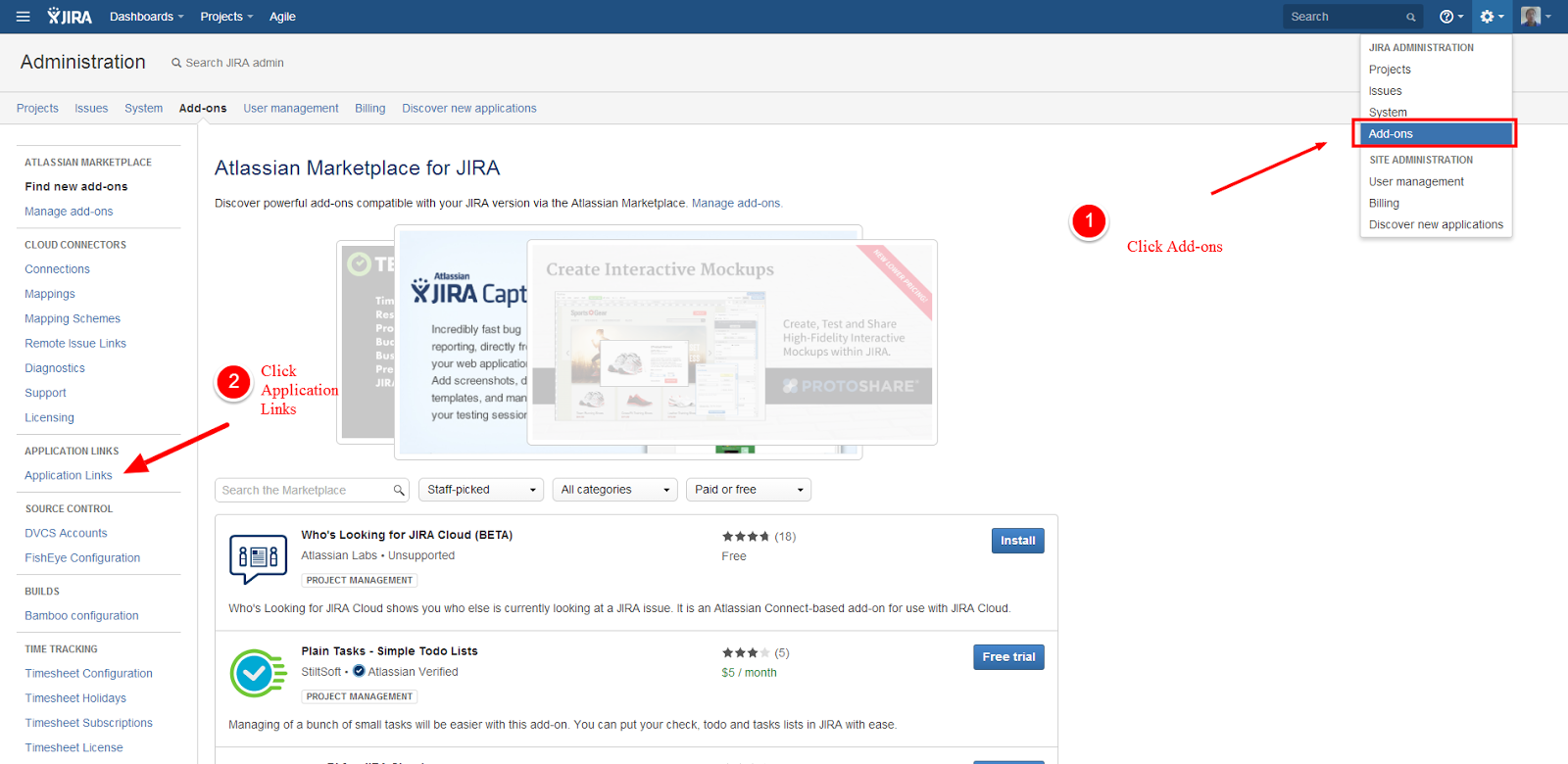
Setup Service Rocket Connector for Salesforce.com and JIRA Are you looking into integrating Salesforce and JIRA? The following product comes pre-installed on Cloud On-Demand JIRA instances. Service Rocket Connector for Salesforce.com and JIRA The ServiceRocket Connector for Salesforce.com and JIRA links and synchronizes Salesforce.com cases and JIRA issues for an integrated experience from either interface. Add your Application Link to JIRA for your Salesforce instance First you need to go into your Add-ons section and navigate to the add a application link for your Salesforce instance: Add application link Add your salesforce domain: Add application link Get your SEN Number You will need your SEN number to setup the plugin. Finding the JIRA Support Entitlement Number (SEN) Acquire a Connector License You will need to acquire a license for the Salesforce JIRA connector.  Navigate to the following link to acquire a license ...

Create a Salesforce User in Apex with all Required Fields Populated

Create a Salesforce User with Code in Apex with all of the Required Fields Populated for a Test Class When attempting to create a user with code in Apex you will encounter an error if you do not populate every single required field. You may be attempting to do this for a Test class or for any number of reasons. The error you encounter may look similar to the following: Missing fields Exception System.DmlException: Insert failed. First exception on row 0; first error: REQUIRED_FIELD_MISSING, Required fields are missing: [LastName, Email, Alias, TimeZoneSidKey, LocaleSidKey, EmailEncodingKey, ProfileId, LanguageLocaleKey]: [LastName, Email, Alias, TimeZoneSidKey, LocaleSidKey, EmailEncodingKey, ProfileId, LanguageLocaleKey] Create a User Many of those fields require specific values populated from a picklist. Below is some boilerplate code you can use to create a use programmatically with all of those fields populated correctly. You can use your own values for...